Search


Control the order in which the document needs to be signed.
If your document has more than one signer, you can choose to set a signing order. This makes sure that each recipient signs the document in a specific sequence. Sequential signing is a premium feature that is available in our paid plans. To understand more about this feature, keep reading!
Sequential signing is a feature that allows multiple signers to sign a document in a specific order. This ensures that each participant signs the document in a predetermined sequence, eliminating confusion and ensuring the integrity of the signing process.
It is particularly useful when there are multiple stakeholders involved. For example, in a document requiring approvals from different departments, the second signer may not be able to sign until the first signer has completed their signature. This ensures that the document moves through the workflow smoothly and according to the desired order.
For instance, a project proposal may require sign-offs from the project manager, finance department, and senior management, in that order.
Sequential signing is often necessary for legal documents. For example, in a partnership agreement, each partner may need to sign in a specific order to maintain legal vah3dity.
To ensure everyone understands the terms of the loan agreement, there’s a need to follow a specific signing order: borrower first, guarantors or co-borrowers second, and finally the loan approver.
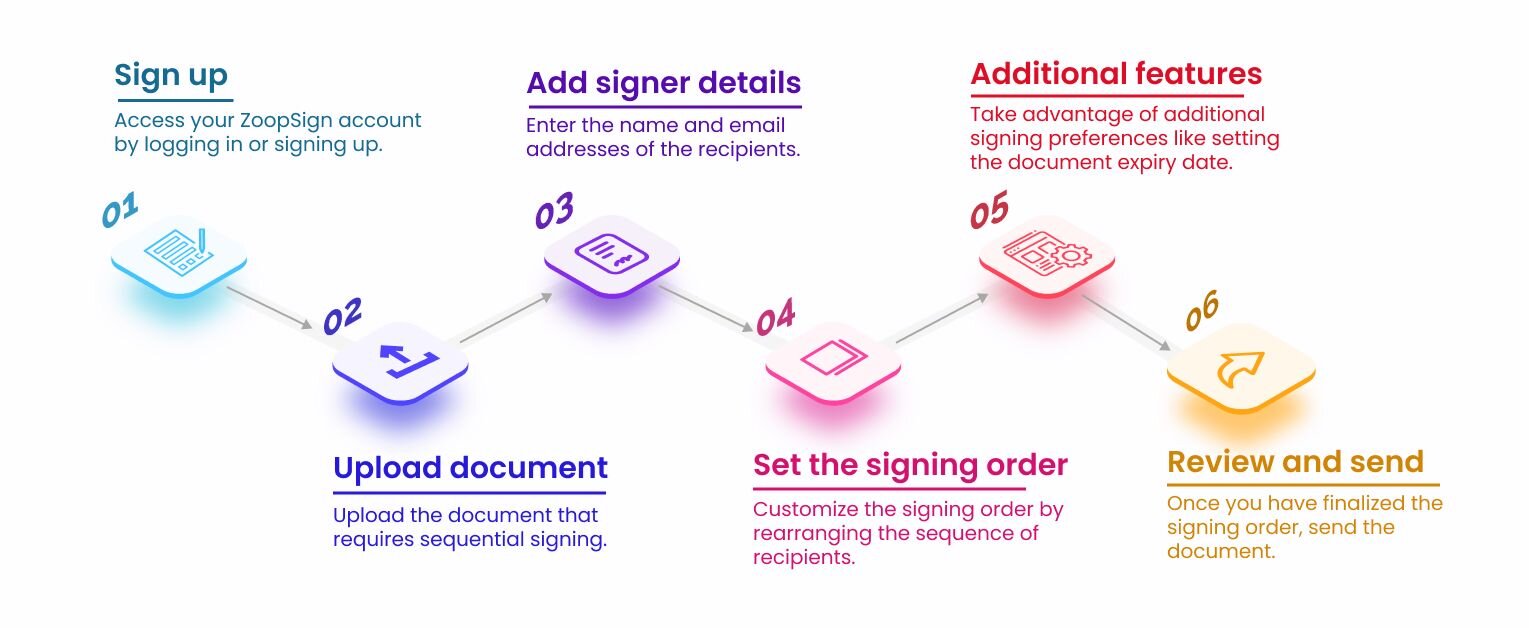
To create a sequential signing order, follow these steps:
Yes
No